服务端—帮助—故障检测
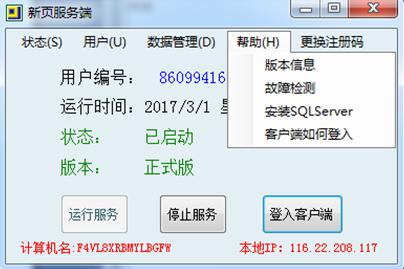
1.检测数据库是否安装并且正常运行
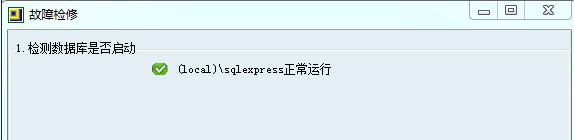
2.检查账套是否可用
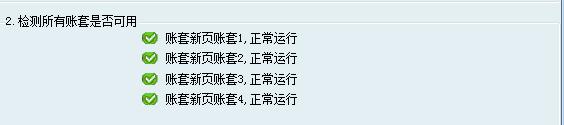
一般重装数据库、数据库丢失、数据库版本不对都会造成账套关联失败。需要安装正确的数据库版本,然后修复数据,才能访问。
3.修改数据库密码
当账套需要由单机版转为互联网或局域网连接,测试连接数据库提示连接失败。数据库密码忘记的情况下,需重新修改数据库访问密码。
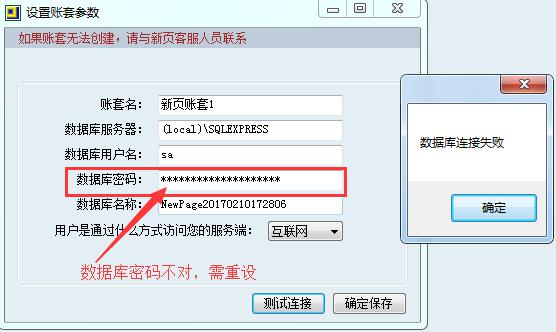

数据库密码设置不能过于简单,须有数字、字母大小写混合。设置完复制一份密码以文档形式保存好。再修改账套的数据库密码,测试连接成功即可保存

注意:电脑中还有其他管理系统如金蝶、管家婆,此时修改数据库密码可能会造成其他管理系统登录失败,请谨慎修改。
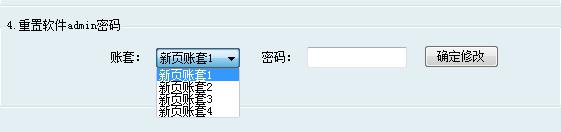
4.修改admin密码
选中账套,重置密码。
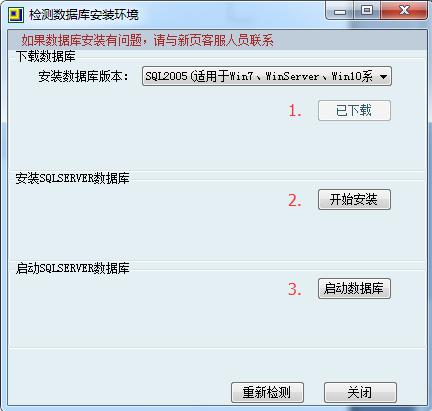
重装系统、换主机、数据库出错等因素,造成账套访问失败。需要安装数据库可在此处下载安装,XP、Win7、Win8、Win10系统均可安装SQL2005数据库。
1.免费版和正式版的区别:https://www.soft2005.com/data-detail-203.html
2.免费版常见问题与解决办法:https://www.soft2005.com/data-detail-204.html
3.如何安装数据库:https://www.soft2005.com/data-detail-257.html
4.新增账套与套用其他账套数据:https://www.soft2005.com/data-detail-235.html
5.无法创建账套:https://www.soft2005.com/data-detail-271.html
6.sql安装失败问题汇总:https://www.soft2005.com/data-detail-280.html
7.SQL数据库安装闪退提示:您的系统内核语言不是简体中文:https://www.soft2005.com/data-detail-295.html
8.检测数据库失败、重装数据库方法:https://www.soft2005.com/data-detail-258.html
9.重装系统后,恢复软件及数据:https://www.soft2005.com/data-detail-422.html
10.更换服务器主机方法:https://www.soft2005.com/data-detail-267.html
11.各版本教学下载:https://www.soft2005.com/data-detail-20.html
12.输入的商品编号已存在的解决方法:https://www.soft2005.com/data-detail-216.html
13.输入的客户已存在的解决方法:https://www.soft2005.com/data-detail-215.html
14.修改入库单提示库存不足不能出库:https://www.soft2005.com/data-detail-220.html
15.计量单位已经被引用解决方法:https://www.soft2005.com/data-detail-217.html
16.出库数量大于当前库存数解决办法:https://www.soft2005.com/data-detail-69.html






















 周一至周五8:45 — 17:45